listyourgame.com
ListYourGame
Find the next indie game by lineage, art style, and genre. Open Steam when one fits.
Open siteThe shelf
An indie game directory, sorted by how a game plays, how it looks, and its genre
Roland · 2 Nov 2026
ListYourGame files new indie games onto shelves. Each card carries one sentence about how the game plays. You open Steam when that sentence fits.
The homepage is a set of shelves
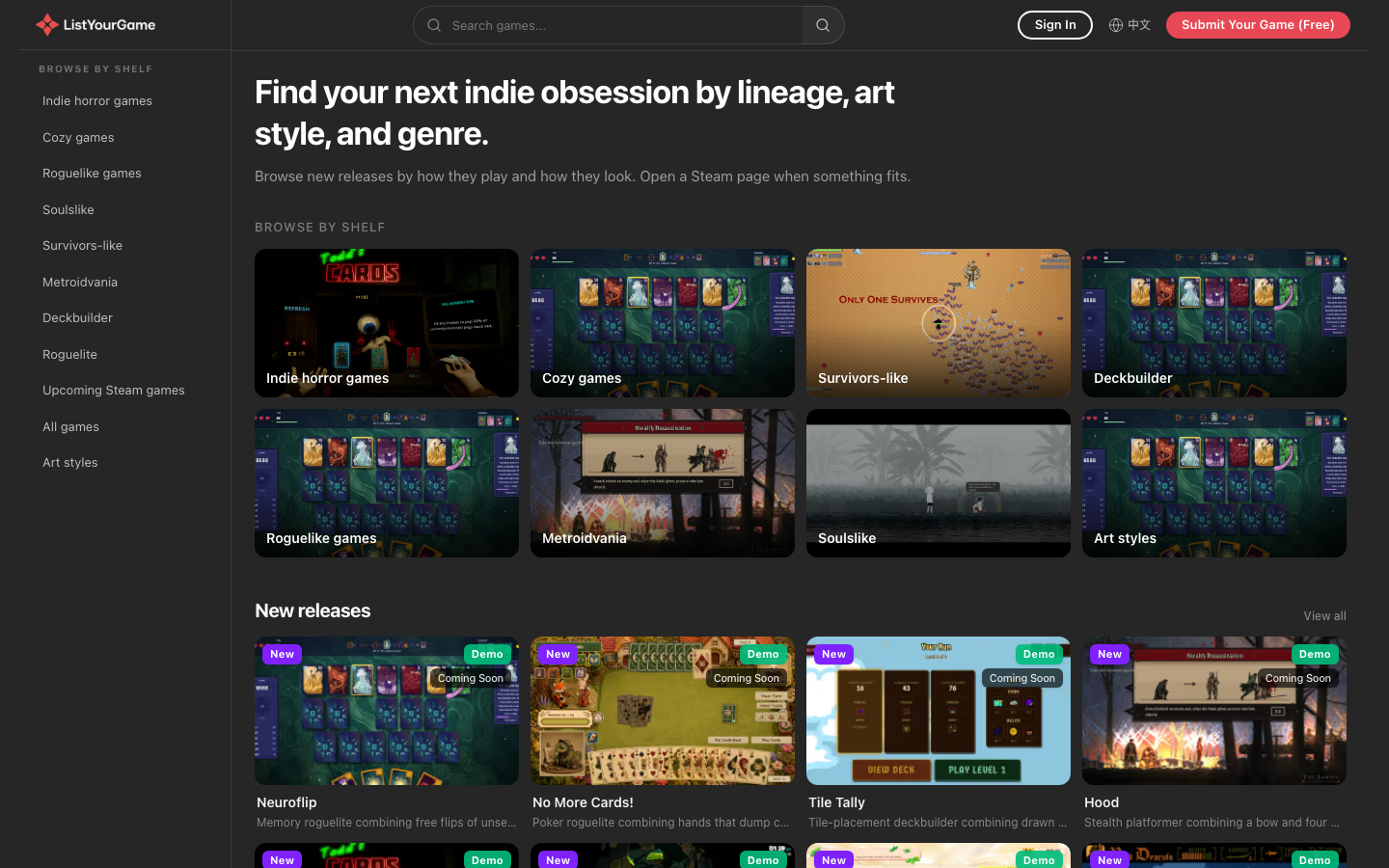
The shelves on the homepage are indie horror, cozy, survivors-like, deckbuilder, roguelike, metroidvania, soulslike, and art style. Below them are new releases. Below those are games with a Steam date still ahead.
A game can sit on more than one shelf. Neuroflip is in new releases, in deckbuilder, and in roguelike. The shelf is the door you came in through. The card underneath is the same game, with the same sentence, whichever door you used.
The sentence is the mechanic
Neuroflip's card reads: “Memory roguelite combining free flips of unseen cards with a life lost only when a seen pair is missed.” Unseen cards can be flipped for free. You lose a life only when you miss a pair you have already seen.
Hood's card reads: “Stealth platformer combining a bow and four melee kits with grace spent on combat trees.” A bow, four melee kits, and a grace resource that is spent on the combat trees.
Zero Survivors reads: “Reverse horde game combining an army you raise with one hero who levels on your kills.” You raise the army. The single hero levels up from your kills.
The shelf name tells you the room. Deckbuilder does not tell you that the life-loss rule is tied to a pair you have already seen. The sentence does. Steam's “about this game” text stays on Steam. The card is written as the mechanic, and a published game is filed under one art style, so the same screenshot does not take a second art shelf under a second label.
The badge picks the next click
You can turn a game down from the card, before Steam opens. When the mechanic fits, the next click is the Steam page.
The badges on the cards are New, Demo, and Coming Soon. Demo means there is a build to try now. Coming Soon means the Steam date is still ahead, which is the case for a wishlist. New means the game has just been filed on a shelf. The homepage is there so that choice happens on the card.
The game page finishes the card
Open Neuroflip and the card grows three beats. Start: “A run crosses three acts of fights, elites, treasure, and shops. Each stage is a grid you flip under a clock.” Play: “A new face is a free flip. Missing a pair you already saw costs a life. Chained matches multiply points, and skills show the rest.” Carry: “After a fight you take one of three skills. Elites grant passives. Coins reroll a merchant. Wins open harder challenge levels.”
Under that, the page says who it fits. One line is: “You want the mistake to be forgetting a face, not missing an attack.” Another is bosses that change the grid, a shuffle or a veil. Then it says who should skip, and the skip is a gap rather than a verdict: “A clock is named, but the page does not say whether time running out costs a life.” The store page mentioned a clock. The listing refuses to invent the penalty. That empty spot is part of the page, because a player deciding whether to open Steam needs to see which rule is still unknown.
The Steam button is on that same page. The listing’s job ends when you have the mechanic, the fit, the skip, and the store.
Submit sits in the corner
The top right of the homepage says Submit Your Game, and the submission is free. The headline is written for the person looking for a game. A developer who wants a listing uses that button. The shelves stay the front of the page.
A submitted game is published as a mechanic sentence on a card. The store description stays on the store. The sentence is what a player uses to refuse the game, or to open Steam.